Lite

Query any database. From the same window as your APIs.

A first-class database client built into Rostyman — 8 supported engines, AI-generated SQL, ER diagrams, EXPLAIN visualizers, and a Verify tab that asserts your DB changed after an HTTP request.
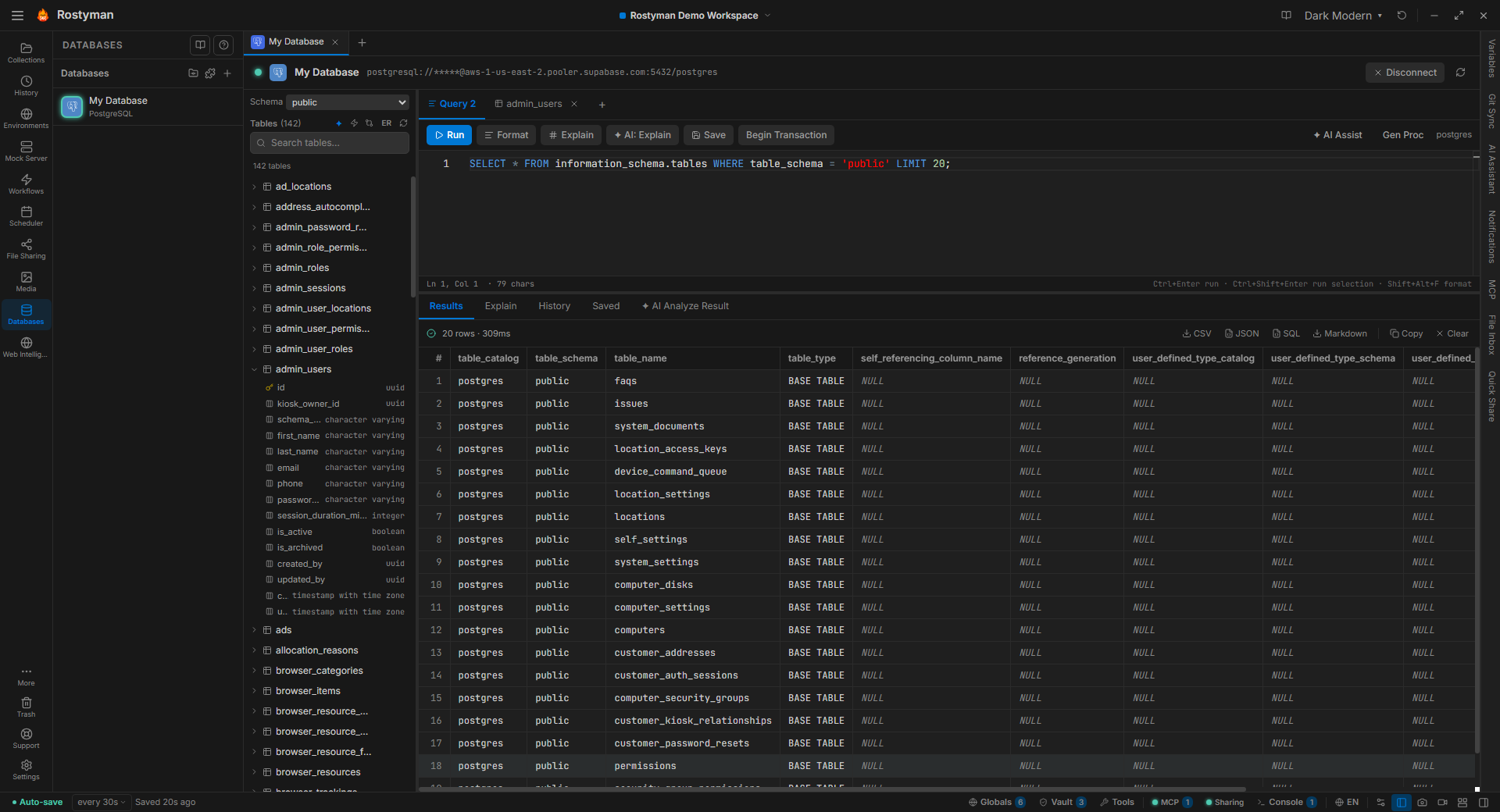
Rostyman database client with the schema browser, Monaco query editor, and result table for a PostgreSQL connection

Why this is different

Other API clients leave you to bounce between TablePlus, DBeaver, and your terminal to verify what an API actually wrote. Rostyman puts the database next to the request — same window, same variables, same environments. You can even attach a SQL assertion to an HTTP request that runs the moment the response arrives.

8 databases supported

One Monaco editor, one EXPLAIN visualizer, one autocomplete engine — backed by the right driver underneath for each engine.

PostgreSQL

Full Postgres support including JSONB, arrays, CTEs, schemas, and PL/pgSQL stored procedures. Pool-based connections, schema-aware autocomplete, and connection-string URI input.

MySQL

MySQL 5.7+ — stored procedures, views, triggers, full-text search, and bulk schema introspection.

MariaDB

MariaDB 10.4+ via the MySQL driver — same query editor, same EXPLAIN visualizer, same auto-reconnect.

Microsoft SQL Server

MSSQL with Azure SQL support, T-SQL editor, schema selector, and connection-string URI input.

SQLite

Open local .db files directly — no connection string needed. Just browse to the file. Bundled, no driver install.

CockroachDB

Cockroach via the Postgres protocol — distributed SQL with the same Monaco editor and EXPLAIN visualizer.

MongoDB

Document queries with expandable card view, formatted JSON, aggregation pipelines, and Atlas-compatible connection strings.

Redis

Key browser with pattern filter, type-aware rendering (STRING / HASH / LIST / SET / ZSET / JSON), TTL inspection, and one-click delete.

ER Diagram — see your schema, not just list it

Auto-detected foreign keys, draggable layout that persists across restarts, MiniMap, Zoom-to-Area, and Fullscreen mode. Export as a 3× pixel-ratio PNG or as a true vector PDF.
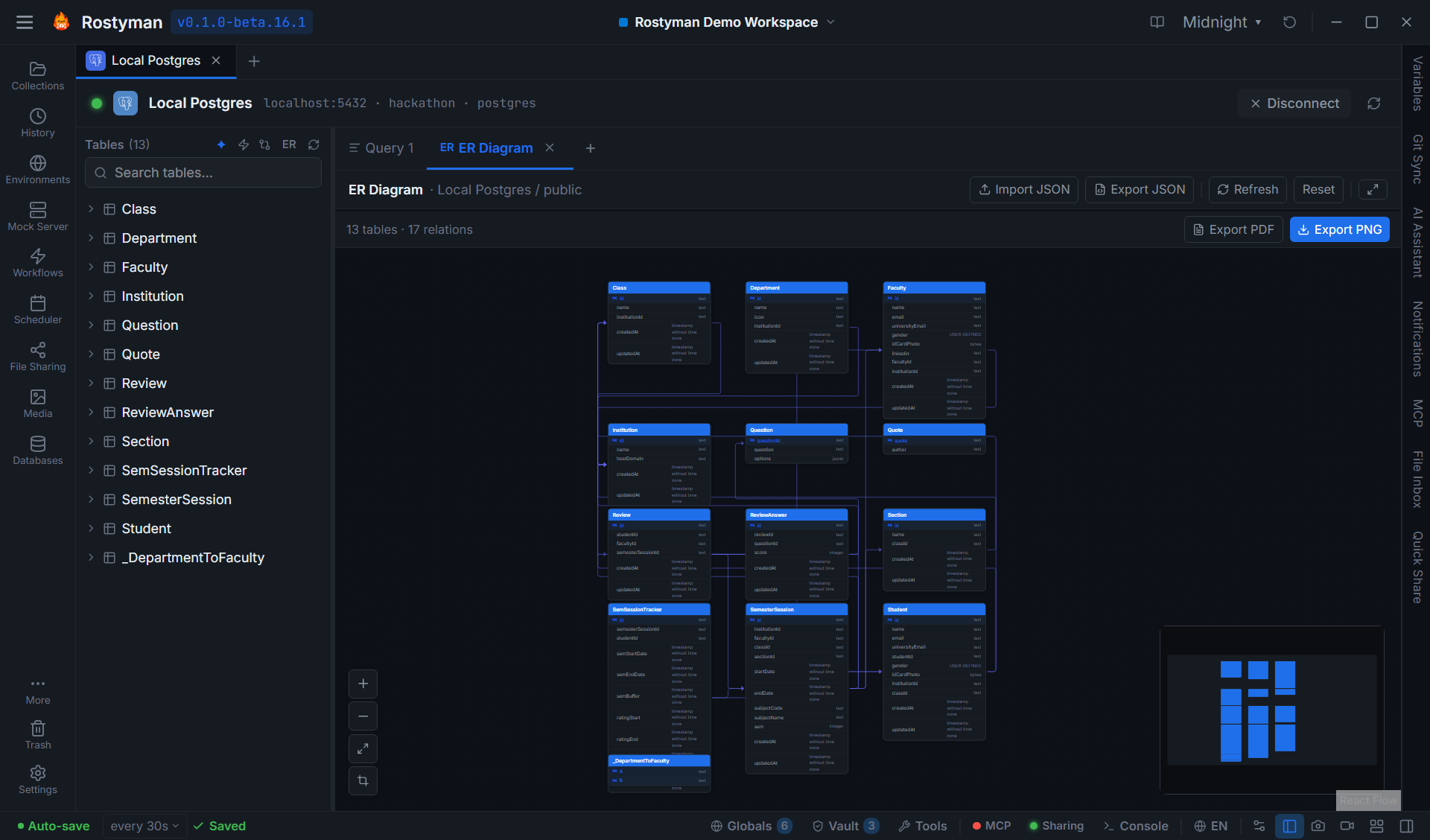
Rostyman ER diagram for a PostgreSQL schema with foreign-key arrows between tables and a MiniMap in the corner

Auto-detected foreign keys

Relationships are introspected from the catalog (or inferred heuristically when the schema is loose). No manual mapping.

Persistent layout

Drag tables into the arrangement that matches how you think about your schema. Position is saved per connection and restored on next open.

MiniMap + Zoom-to-Area

Pan with the corner MiniMap or click the crop icon and drag a rectangle — the canvas zooms to fit. Esc cancels.

Fullscreen mode

Click Maximize in the header to expand the canvas edge-to-edge. Press Escape to exit. Big schemas finally have room to breathe.

Vector PDF export

PDF export uses real <rect>, <text>, and <path> elements — text and shapes stay sharp at any zoom level. Drop straight into a design doc.

Layout JSON

Export the layout as JSON, share it with a teammate, re-import into the same connection. Self-healing merge if tables changed.

AI that knows your schema

Not generic chat — the AI assistant is wired to your connection. It sees your tables, columns, and types so the SQL it generates actually runs.

Plain-English → SQL

Type "show me all orders from last week with total above $500, sorted by customer name" and get a runnable SQL query that respects your schema. Works for MongoDB queries too.

Schema analysis

One click audits your schema for missing indexes, missing constraints, and type mismatches — with per-table recommendations you can apply or copy.

Stored procedures, functions, triggers, views

Describe what you want in English and get a ready-to-run CREATE statement in your dialect. Switches syntax automatically between PG / MySQL / MSSQL.

EXPLAIN that explains

Paste an EXPLAIN plan and ask "why is this slow?" — the AI walks you through the cost nodes, missing indexes, and bad joins in plain English.

Generate a full API collection from your schema

One click. Pick the tables you want. Rostyman writes a complete REST collection — List, Get by ID, Create, Update, Delete per table — into a folder, ready to send.
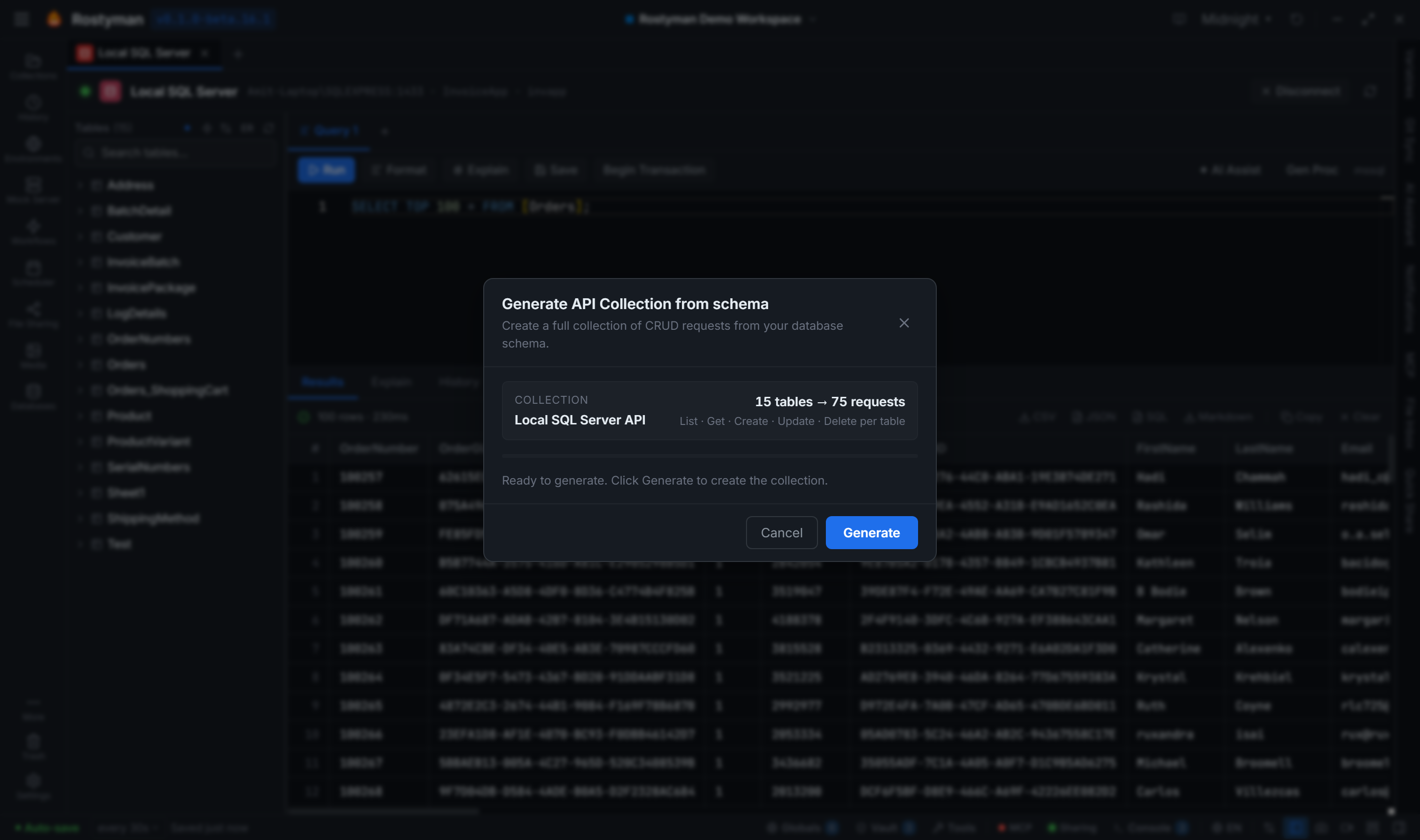
Rostyman generating a CRUD API collection from a database schema — sidebar shows the new collection appearing live with folders per table
Choose any subset of tables — or generate for the whole schema
Five requests per table: List / Get / Create / Update / Delete
Folders, names, and descriptions populated automatically
Variables for {{baseUrl}} and ID parameters wired up
Generated collection appears in the sidebar live — no restart needed
Progress dialog with table count → request count stats while it runs

DB Verify — assert your database changed

Add a SQL assertion to any HTTP request. After the response arrives, Rostyman runs the query against the connection of your choice and tells you whether the row appeared, the count went up, or the field flipped to the right value.
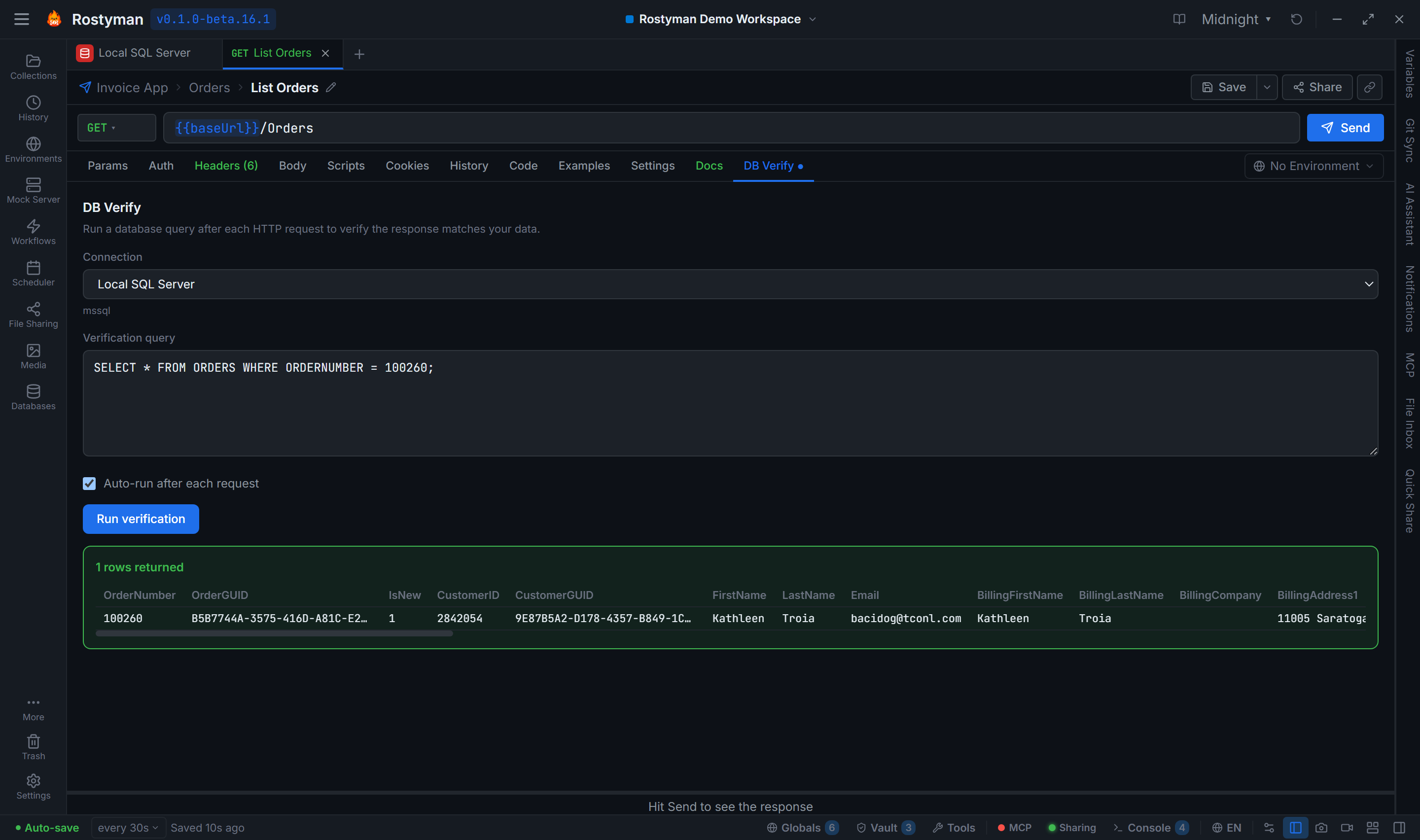
An HTTP POST request in Rostyman with the DB Verify tab open showing a SQL assertion that ran after the response and a green pass indicator

One tab next to your headers

Open any HTTP request → DB Verify tab. Pick a connection, write the SQL, set an assertion. It runs after the response, every time you Send.

No more bouncing between tools

No more Send-then-Alt-Tab-to-TablePlus-then-back. The pass/fail badge sits right under your response, with the row count and matched values one click away.

Query editor + schema browser

Monaco at the centre, your schema in a sidebar. Everything else is built around making queries fast to write and easy to navigate.

Schema-aware autocomplete

Tables, columns, and types complete inline as you type. Dot-completion on aliases. Singleton across all open query tabs so it stays fresh.

SQL hover tooltips

Hover any keyword for inline SQL reference — no docs tab, no Stack Overflow detour.

Multiple query tabs

Each connection can hold many query tabs at once. Tab state survives restarts so your work-in-progress queries are still there tomorrow.

Run / Stop with progress

Run one statement or the highlighted block. A rainbow progress bar shows the query running. Stop cancels mid-flight.

EXPLAIN visualizer

Color-coded execution plan tree per driver — Postgres node tree, MySQL row table, SQLite QP tree, generic fallback for the rest.

Result formats

Render results as a table, JSON, CSV, INSERT statements, or Markdown. Copy any cell, row, or selection in one click.

Inline cell editing

Double-click any cell to edit. Changes generate preview UPDATE / INSERT / DELETE SQL before executing — full undo support.

Variables in queries

Use {{tokens}} from the active environment, globals, or vault. The same variable resolution as your HTTP requests.

Browse mode

Click any table for a paginated row browser with column-type badges, multi-column sort, and one-click row delete.

Query history, saved queries, and native views

Everything you run is searchable. Queries you care about can be promoted, named, and tagged.

Searchable query history

Every query auto-saved per connection. Filter by text, time window, or status. Re-run any past query in one click.

Saved queries with folders + tags

Promote important queries with a name, description, tags, and a folder. Tree view in the sidebar — works just like collections.

MongoDB document cards

Document results render as expandable cards with formatted JSON. No more squinting at a table view that fights against nested objects.

Redis key browser

Pattern filter, type-aware rendering for STRING / HASH / LIST / SET / ZSET / JSON, TTL inspection, one-click delete. Feels like a native Redis tool.

CSV / JSON data import

Drop a CSV or JSON file onto a table — column-mapped insert with a preview before commit.

DB Projects

Three-level hierarchy — Project → Group → Connection. Drag connections between groups, redesigned Assign-to-Group dialog, color-coded badges in the sidebar.

Production-safe by default

The features that keep you from being the person who ran DELETE without a WHERE clause.

Destructive query safety

Any DELETE, DROP, or TRUNCATE on a connection marked "production" requires typing the table name to confirm. Protects against accidental data loss.

SSH tunnel support

Connect to databases behind firewalls via SSH bastion hosts. Key-file and password auth. Works with all networked drivers.

Auto-reconnect

Connections dropped due to idle timeout, network blip, or server restart are automatically re-established with exponential backoff.

Friendly error classifier

Connection failures are mapped to one of 7 plain-English codes — refused / not found / timeout / auth failed / database not found / TLS error / unknown — instead of cryptic driver tracebacks.

Long-running query notifications

Queries running over a configurable threshold pop a desktop notification so you can carry on while the database thinks.

Transactions

BEGIN, COMMIT, ROLLBACK first-class in the editor. Multi-statement transactions stay on one connection so locks behave predictably.

Schema diff with migration SQL

Compare two databases or two snapshots of the same schema. Visual diff highlights added, removed, and modified tables/columns. Generate migration SQL automatically.

Environment-aware connections

Resolve {{tokens}} from environment, globals, and vault. Switch envs to point the same query at dev / staging / prod.

One window. Eight databases. No tab-switching.

The full database client ships free in Rostyman Lite — download today, no account required. Connect your first database in under a minute.

Download Free