Lite

Every protocol. One window.

From simple REST calls to streaming WebSockets and AI agent tools via MCP — Rostyman handles every protocol your stack uses without switching apps or installing plugins.
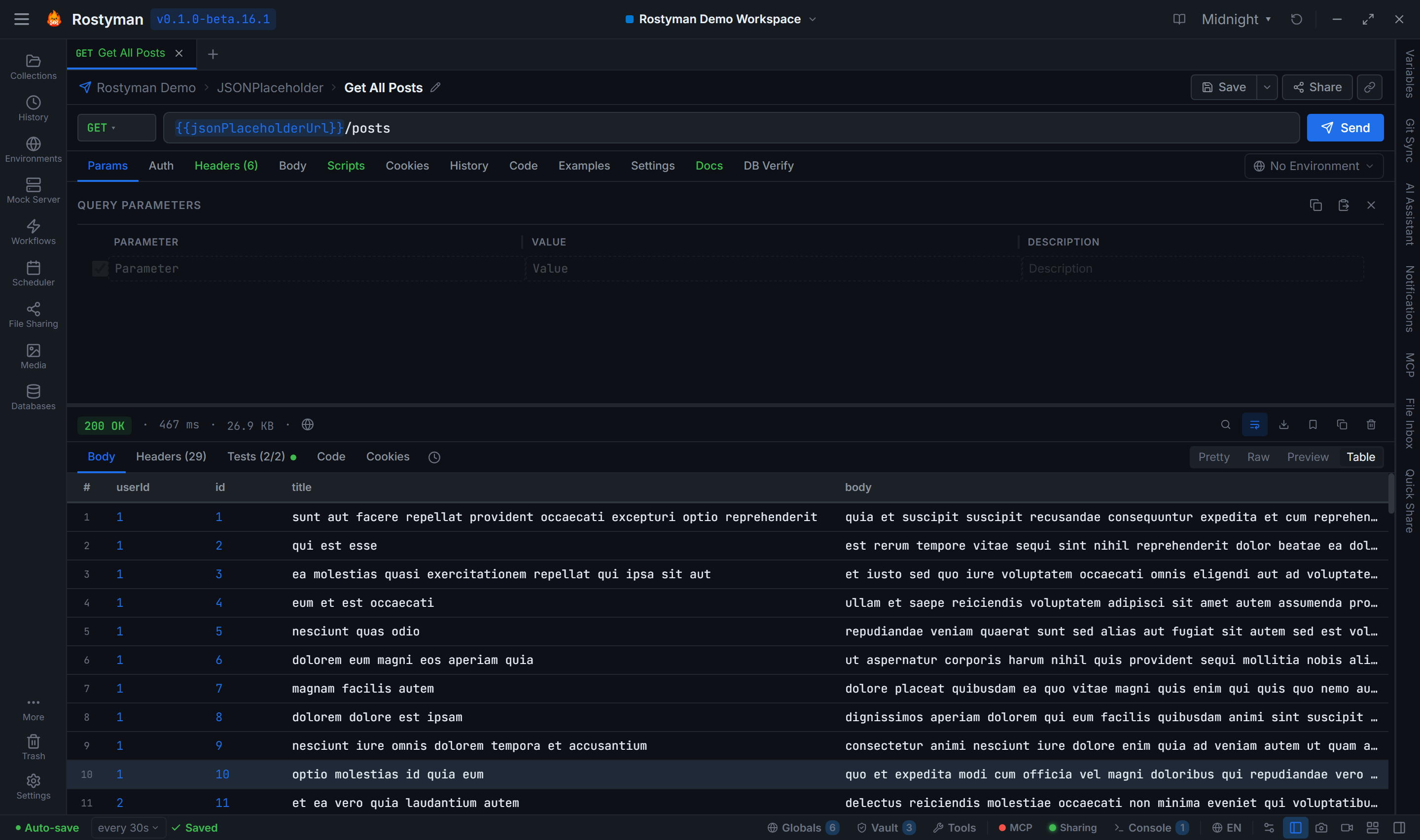
Rostyman request builder with collections, request tabs, and response viewer

8 protocols, all free

HTTP / REST

Full REST client with query params, headers, body (JSON/XML/Form/Binary), cookies, redirects, SSL, and proxy support. Response viewer with syntax highlighting, search, and copy.

GraphQL

Schema introspection, query/mutation/subscription support, variables editor, fragment support, and inline documentation from your schema.

gRPC

Proto file import, unary + server streaming + client streaming + bidirectional streaming. No grpcurl needed — visual interface for every call type.

WebSocket

Send and receive text/binary frames, custom headers on handshake, message history with timestamps, ping/pong, and reconnect logic.

Socket.IO

Native Socket.IO client (not just raw WebSocket). Emit and listen to named events, namespaces, rooms, and acknowledgements.

MQTT

Broker connection with TLS, username/password, client ID, QoS 0/1/2, retain, will messages, topic subscriptions with wildcard support.

Server-Sent Events

Connect to SSE streams, view events in real-time, filter by event type, and export the full stream. Ideal for testing push notification backends.

MCP

Model Context Protocol — connect to AI agent tool servers, list tools and resources, call tools directly, and debug AI agent integrations. First API client with native MCP support.

Complete auth support

Every auth scheme your API uses — with inheritance from collection to request.

Bearer Token

Set a static token or reference an environment variable. Auto-appends to Authorization header.

Basic Auth

Username and password with Base64 encoding handled automatically.

OAuth 2.0

Authorization Code (+ PKCE), Client Credentials, Password, and Implicit grant flows. Token expiry shown inline.

OAuth 1.0

HMAC-SHA1 or PLAINTEXT signature. Signature base string and Authorization header computed automatically.

API Key

Send as header or query parameter. Configurable key name.

Digest Auth

Full Digest authentication with nonce/qop/nc support.

AWS Signature v4

Sign requests for any AWS service. Provide access key, secret, region, and service.

NTLM

Windows NTLMv2 three-message handshake for on-prem SharePoint, IIS, and Exchange.

Hawk

HMAC request signing with auth ID, key, and sha256/sha1 algorithm.

JWT Bearer

Sign a JWT (HS/RS/ES/PS) from your claims and send it as a header or query param.

Akamai EdgeGrid

EG1-HMAC-SHA256 signing for Akamai {OPEN} APIs.

ASAP

Atlassian service-to-service auth — a signed JWT with kid/iss/aud claims.

No Auth

For public endpoints or when auth is handled entirely in scripts.

Pre and post-request scripts

Write JavaScript in a Monaco editor to run logic before requests (set dynamic variables, compute signatures, refresh tokens) or after responses (run assertions, chain values to the next request, update environments).

  • rm.environment.set() and rm.environment.get()
  • rm.test() for inline assertions with pm.*-compatible API
  • rm.expect() for chai-style assertions
  • Access to request, response, and all variable scopes
// Pre-request script
const ts = rm.variables.get('$timestamp');
rm.environment.set('nonce', ts);
// Post-response tests
rm.test('Status is 200', () => {
rm.expect(rm.response.status).to.equal(200);
});
rm.test('Has user id', () => {
rm.expect(rm.response.json).to.have.property('id');
});

Variable resolution chain

Use {{variable}} anywhere. Resolved in priority order:

1Globals / Vault

Lowest priority. Shared across all collections and workspaces. Vault values are encrypted.

2Collection Variables

Collection-scoped. Shared across all requests in the collection, regardless of active environment.

3Environment Variables

Environment-scoped. Switch environments to change base URLs, keys, and config without editing requests.

4Built-in ($)

Highest priority. Dynamic values like {{$timestamp}}, {{$randomInt}}, {{$randomUUID}}.

Import from anywhere

Bring your existing collections with you. All common formats supported.

Postman Collection v2.0 / v2.1Postman EnvironmentInsomnia v4Bruno (.bru)OpenAPI 3.xSwagger 2.0HARcURL command.rostyman format

Built into your desktop, not a browser tab

Rostyman behaves like a real desktop app — drag, drop, double-click, and it just works.

Drag & drop import

Drop a Postman, Insomnia, OpenAPI, HAR, or .rostyman file anywhere on the window. Rostyman detects the format and imports.

.rostyman file association

Double-clicking a .rostyman or .rostyman-workspace file in your file manager opens it directly in Rostyman.

Source file watching

Imported a collection from a file? Edits to the source file flow back into Rostyman automatically — no re-import needed.

URL-based import / sync

Paste a public URL to a Postman, OpenAPI, or .rostyman file and Rostyman pulls + re-syncs on a configurable interval.

Workspace files

Export a workspace as a single .rostyman-workspace file — collections, environments, scripts, mock servers, settings — for backup or to ship to a teammate.

Cloud sharing

Publish a collection to Google Drive or Dropbox; the link auto-syncs for everyone who imports it. No Rostyman cloud required.

DB VERIFY

Assert your database changed — right next to your headers.

Every HTTP request has a DB Verify tab. Pick a connection, write a SQL assertion, hit Send. Rostyman runs the query the moment the response arrives and tells you whether the row appeared or the field flipped to the right value.

See the database client →

Start testing every protocol today

Free download — all 8 protocols included, no account needed.

Download Free